• Skip to primary navigation
  • Skip to main content
  • Skip to primary sidebar
PPC Mastery Course

PPC Mastery Course

Learn Google AdWords from an Expert

  • Buy PPC Course
  • Reviews
  • Resources
  • About Us

PPC News

The anatomy of a successful AdWords text ad

December 18, 2017 by Jeff Sauer

There are a lot of essential components to focus on when you’re building an AdWords campaign – keywords, bidding strategies, quality scores, landing pages, conversions, etc.

AdWords has so many moving parts and data points it’s easy to overlook one of the most important components – THE AD ITSELF!

You can optimize your campaign and your landing pages all you want, but if your ad copy isn’t any good… Then you just planned the best party no one will attend.

Ads are the gateway to attracting searchers to your offer

A good AdWords text ad grabs a searcher’s attention, or even better, triggers an engaged emotional reaction.

A bad ad bores searchers and kills your quality score.

In this post we will look at some great ad copy! We will dissect some successful ads, so you can ethically steal their winning strategy and use it in your ad writing.

We also share three proven copywriting formulas you can use to create engaging ads.

[thrive_2step id=’132716′]Download anatomy of a successful AdWords text ad[/thrive_2step]

Maximize your text ad visibility

Text ads don’t give you a lot of space to grab the searcher’s attention. Maximizing your ad visibility by building out every component of your ad is a great way to make your ad impressions stand out.

The ad below combines visibility with calls to action, and benefits that meet the searcher’s goals.

This ad displays on the ultra-competitive, high commercial intent search term, “hotels in New York City.”
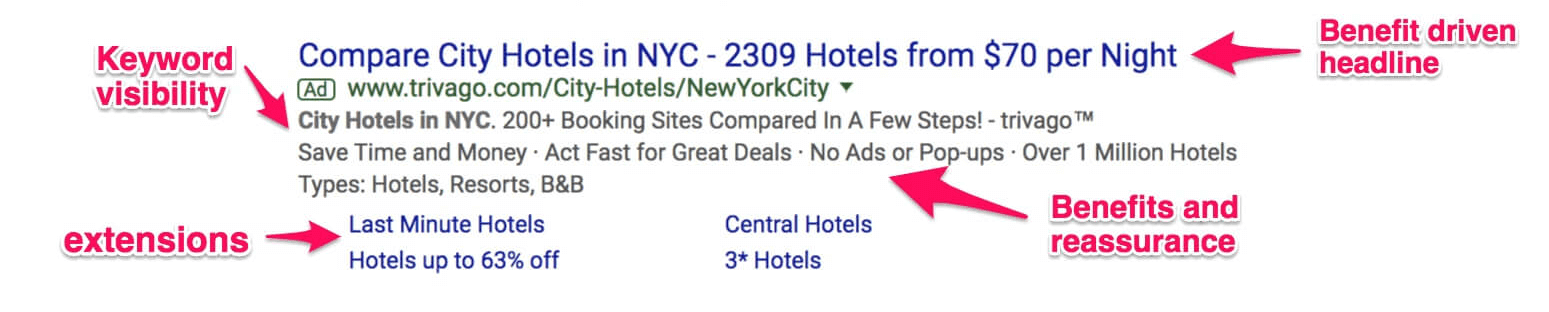
AdWords text ad NYC hotels

Headline: The headline in this ad immediately calls your attention to a benefit. It lets the searcher know that clicking the ad will allow them to accomplish their objective. It also qualifies a comfortable price point.

Description lines: The description contains the keyword, and lists more easy to read benefits. The “No Ads or Pop-ups” text is an effective way to let the searchers know they won’t receive any unwanted promotions if they click through.

Extensions: This ad is loaded up with ad extensions. The extensions maximize the ad space. Even if the searcher doesn’t click the extension links, they still get more information about how this result will help them achieve their goal.

What can you learn from this ad: This ad is a great example of how to maximize ad visibility, and how benefit driven ad copy can instantly connect with a searcher’s needs.

Write ads that solve your customer’s problems, and reassure their concerns

The example below compares and contrasts two ads that are displayed on a search for “plumbers in Philadelphia.”

The RotoRooter ad is a great example of prioritizing the searcher’s mindset.

The writer for the RotoRooter ad nailed every part of drawing the searcher’s attention, offering an immediate benefit, reassuring their concerns, and providing the information they need to take action.
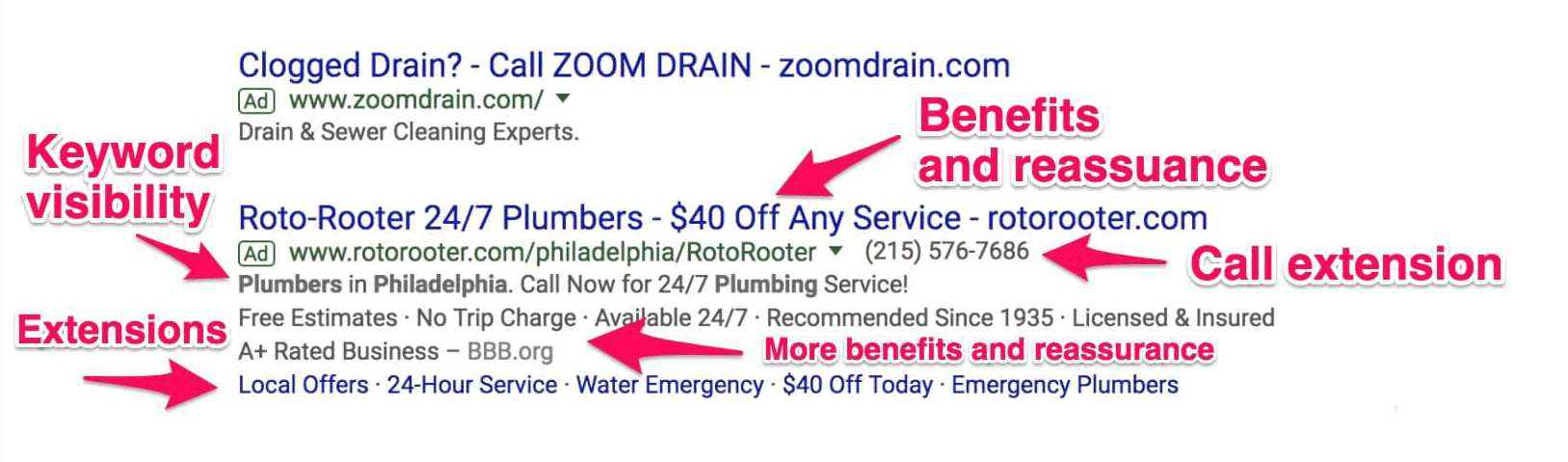
AdWords Text Ad RotoRooterHeadline: The headline includes an immediate benefit related offer that also reassures price concerns.

Description lines: The description includes keyword visibility, more benefits, price reassurance, and social proof.

Extensions: They’ve enabled their call extension, which offers the searcher an immediate solution. They have also built out multiple call-out extensions, and a review extension.

In contrast with the ad above it, the RotoRooter ad is much more compelling. The ad extensions also maximize their chance of winning a conversion.

The shorter ad for Zoom Drain is not targeted for this search, and does nothing to entice or qualify clicks. It appears this ad is throwing money down the drain. ?

The ad results on this search are a great example of what to do, and what not to do when designing [and targeting] your ad.

What can you learn from this ad: Copy that offers a solution is compelling. Copy that offers a solution, overcomes fears or objections, provides an opportunity to take immediate action and provides an incentive to take that action is outstanding.

Try to think of the immediate benefit your searchers hope to get when writing your ad copy. Also, think about any fears that would prevent searchers from clicking your ad while trying to obtain that benefit. The more you can make the copy both compelling and reassuring, the more likely you are to win the click.

How to write emotionally compelling text ads

It’s not easy to write an emotionally compelling text ad with limited characters available. But if you can pull it off, engaging a searcher gives you a superior chance to win a conversion.

The majority of studies on purchasing psychology have shown that as much as we want to be rational, our decisions are usually tied to deep underlying emotions.

The ad below for marriage counseling doesn’t shy away from the heightened emotional component of their services.

This is a case where the copy is so compelling that the writer was able to do more with less.

The ad writer delivers a powerful message that connects with the searcher’s problem. The ad also avoids overwhelming the searcher with too much information. Let’s break this ad down a little further.
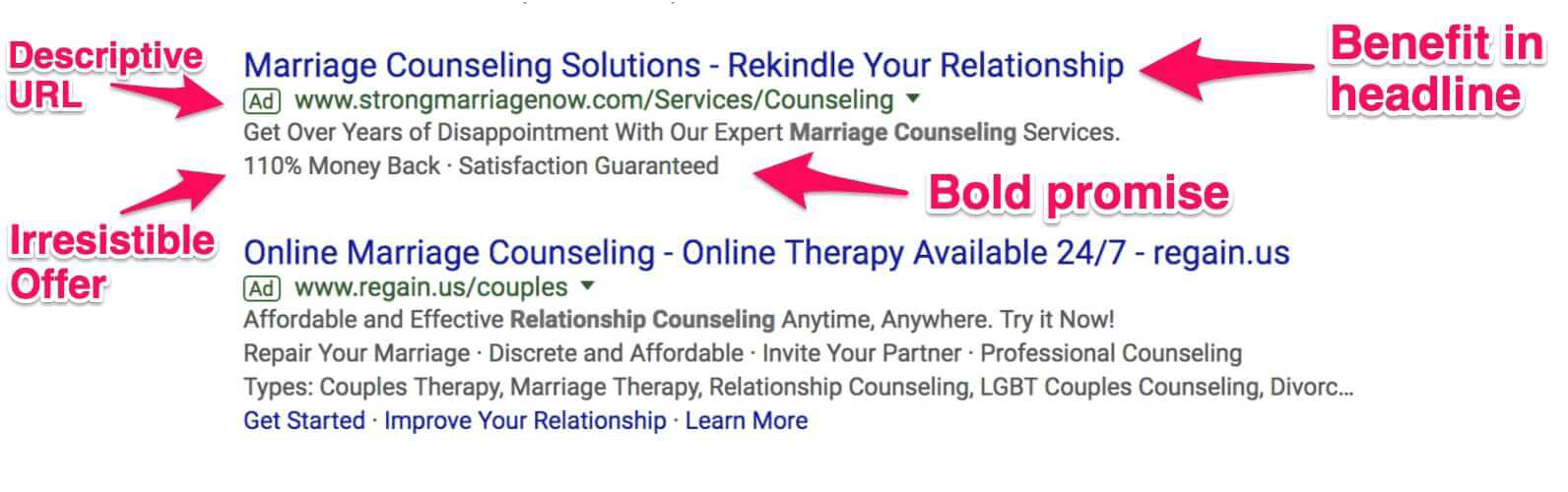
AdWords Text Ad Marriage Counseling

Headline: The headline targets the search keyword “marriage counseling” and calls attention to searcher’s ultimate goal “Rekindle Your Relationship.”

Display URL: The ad writer even included emotionally compelling copy in the display URL.

Description lines: The description lines are where this ad really succeeds.

The call to action recognizes the searcher’s problem and offers a solution in a single line of text.  Even though I’m not in the market for counseling, I still want to click this ad. After all, who doesn’t want to “Get Over Years of Disappointment?”

The engaging emotional copy is followed by an irresistible offer – “110% Money Back.” This offer is so reassuring it creates an element of wonder and disbelief. Who offers a 110% guarantee?

The only thing this ad is missing might be a phone call extension.

I included the second ad in the results to contrast the two different ad writing approaches.

Although the second ad is well optimized, it’s just not as engaging. It also misses the mark with its description. “Affordable and Effective” is probably a better description for a divorce lawyer than a marriage counselor.

Without access to the back-end data, it’s tough to know which ad converts better.  But from a copywriting perspective, the first ad is a clear winner.

What you can learn from this ad: Test aggressive emotional copy and direct copy in your text ads.

Some products and services naturally have a heightened emotional element.  If you’re advertising in one of those areas, meet the searcher at their emotional distress point with your ad and offer a compelling solution.

If you know your searcher is likely to have a distressed mindset, test ads that don’t overwhelm the reader with too much information.

Keys to a successful AdWords text ad

Here’s what we’ve learned from the text ad examples we’ve studied:

  • Write headlines that match your target customers needs
  • Focus on benefits in headlines
  • Use extensions to maximize your ad space
  • Reduce any friction that might prevent a click with reassuring benefits
  • Meet your target customer at their pain point and provide a solution
  • Choose a descriptive or engaging display URL
  • Use keywords in your description lines
  • Be granular with your ad writing and targeting

Now let’s look at some copywriting formulas that can help you write a compelling text ad.

Text ad copywriting formulas

The Russell Brunson “get this without that ” formula.

The “get this without that” formula is great a way to engage your searcher on an emotional level. This formula helps you write ads that speak to the benefit the searcher wants, while reassuring they won’t experience the pain or frustration they don’t want.

Here are some examples of what this formula looks like:

“Lose weight without dieting”
“Design your dream home without a contractor”
“Make delicious dinners in minutes”

Here’s how to use this formula for your product or service:

Get this – the compelling benefit your product or service offers, without that – The main pain point or frustration your product or service relieves.

Attention + Interest + Urgency formula

The most tried and true copywriting formula is AIDA – [attention, interest, desire, action].

Attention + Interest + Urgency is like a condensed version of the AIDA formula. Here’s a template you can use for this formula.

Headline = Attract Attention (be relevant)
Description line two = generate interest (be useful)
Description line three = ask for the click (show value)

To read a complete description of this formula see this post by Amy Hebdon of Blast.

Product + Benefit formula

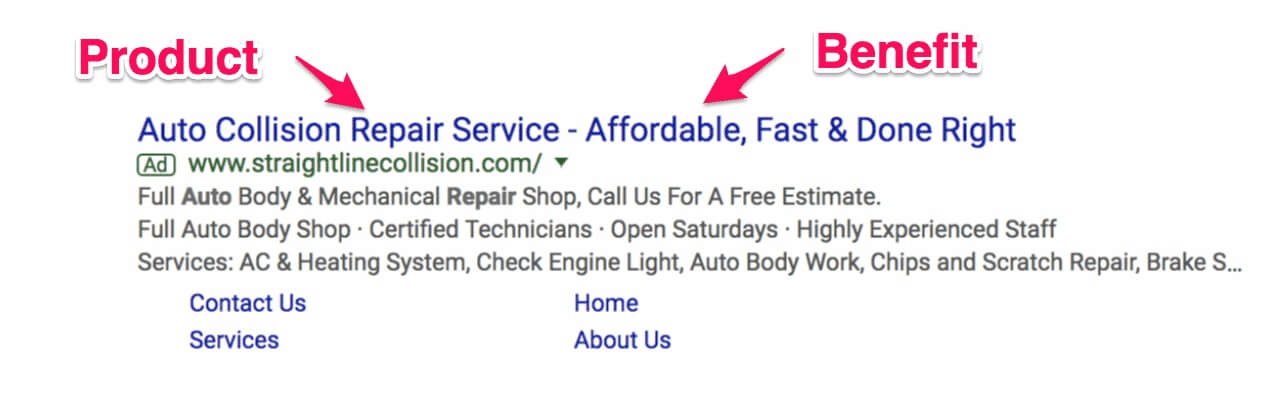
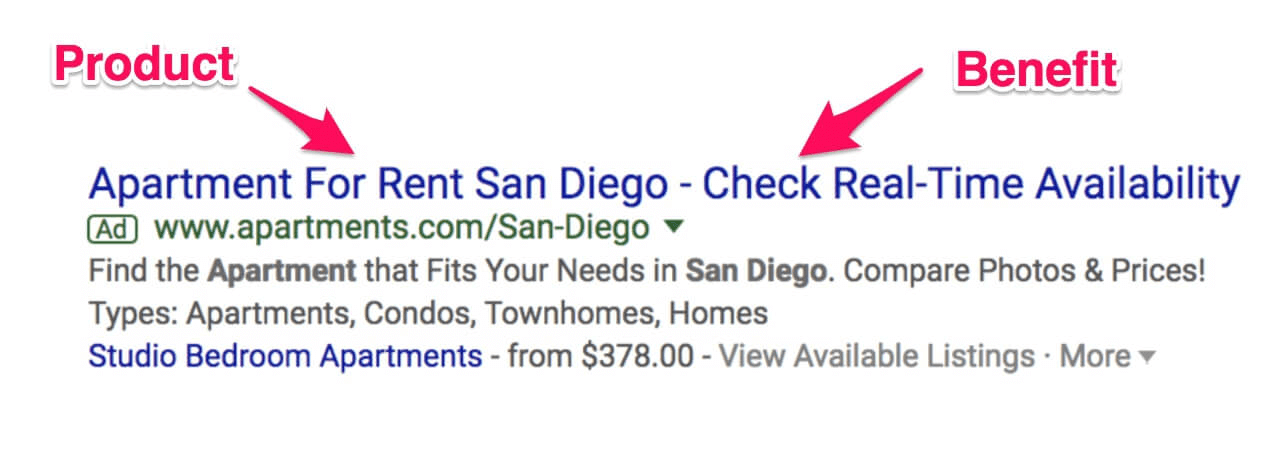
The product plus benefit formula was evident in each of the ads we dissected in this post. It’s simple way to write your headline and build out your descriptions.

Here are some examples of the Product + Benefit formula
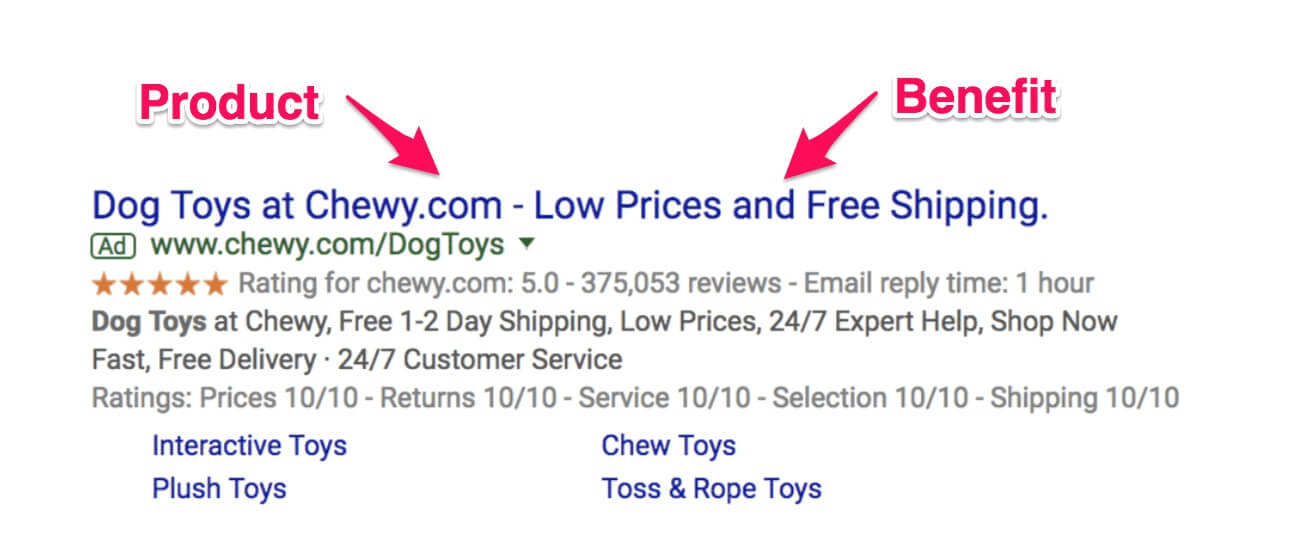
AdWords Text ad Dog Toys

AdWords text ad Auto Repair

AdWords text ad Auto Repair

Build a text ad swipe file

The best way to write winning ads is to leverage what’s already working. Keep a swipe file of the best ads you see. When it comes time to write your ads, use your swipe file to help you write great ad copy.

You can download the PDF of this post here and ad it to your AdWords swipe file.

[thrive_2step id=’132716′]Download anatomy of a successful AdWords text ad[/thrive_2step]

And always remember to test multiple ads and use your performance metrics to determine the winner. Some ad writing formulas will work better than others, depending on the keyword, context and other environmental factors.

This is why testing multiple ads is so important. Google gives us the opportunity to test many ads at a time. Be sure to use this to your advantage.

Filed Under: PPC News

Google Closing Partners Certification Portal in 2018

December 11, 2017 by Jeff Sauer

For those of you who are certified with Google AdWords, or looking to obtain your certification, I wanted to call your attention to a new platform that Google will be rolling out on January 16, 2018.

Google is moving certifications from Google Partners to the Google Academy for Ads.

If you are already certified, you should have received an email from Google with details about the switch (and how to transfer your certifications).

If not, hopefully this post triggers you to check out the new portal before the cutover date.

To find more about this switch and the changes to your certification records check out the video and post  below.

Changes to AdWords certification exams

For years, we have been able to take our exams and store our results in Google Partners. This switch represents a significant change to how certification works.

Starting in January of 2018 certification exams will be taken in the Google Academy for Ads.  In addition, the exams will be referred to as assessments.

Changes to Google certification records and Google Partners profile

Google is also moving your individual certification records to an Academy for Ads account.

When you log into your Google Partners account profile, you will see a notice like the one below.  Google has automatically selected that your certifications will move to an Academy for Ads account in January of 2018.

Google Partners Certification notice

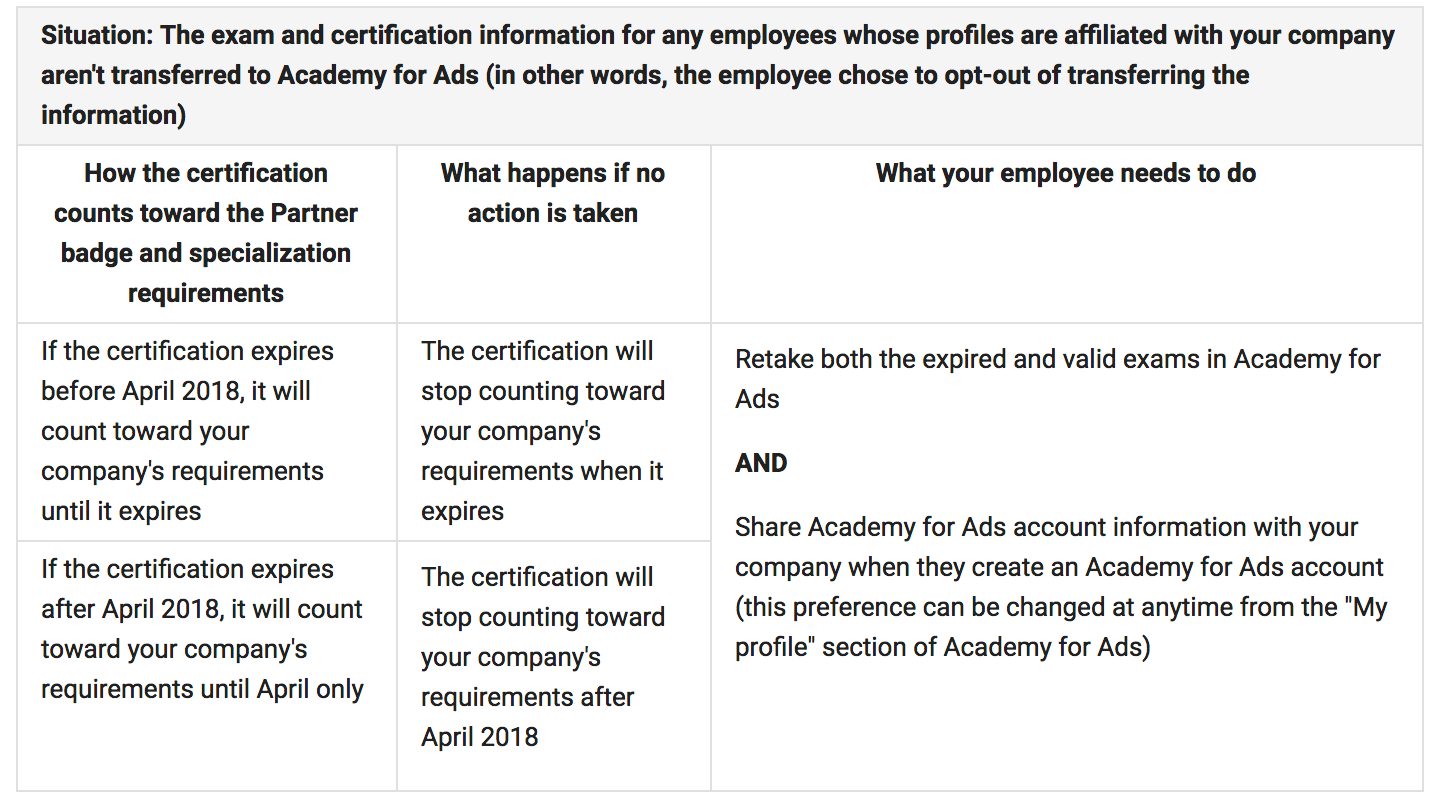
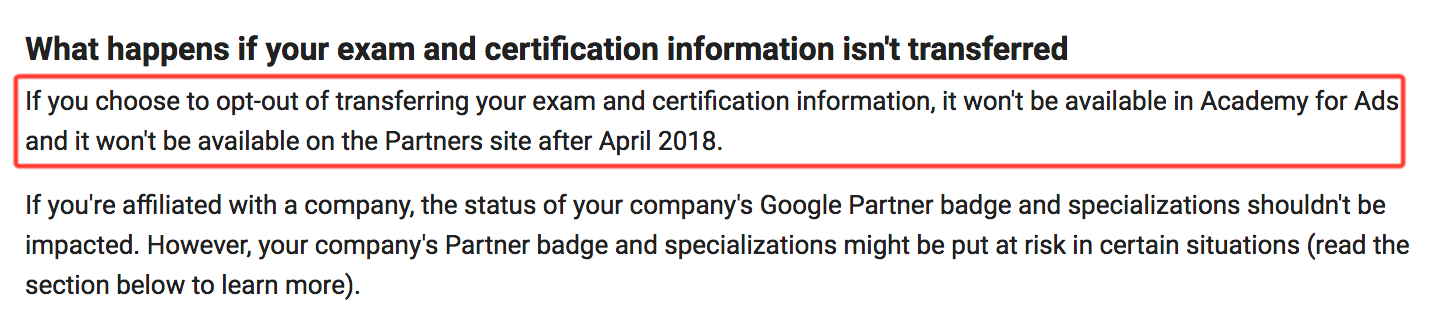
If you opt-out of moving your certification records to the Academy for Ads, you may lose access to those certifications in April of 2018.  See Google’s documentation below.

Google Partners certification changes

Google’s documentation also indicates that agency employees who opt-out of the switch to Academy for Ads could negatively affect their agency’s status or specializations.  If your certification lapses after April 2018, opting out of the switch will cause your certification to expire early.

Google certification profile changes

If you do nothing (don’t opt-out) your certification(s) will automatically transfer to an Academy for Ads account.

Following the January 2018 switch, Google will also eliminate the Google Partners individual public profile.  At this time It’s unclear how to make your certifications and profile public on the Academy for Ads platform.

Recommendations

We recommend that if you’ve been considering getting certified, or need to update your certification soon, you should do it before the changeover.

In typical Google fashion, they have not provided any tangible information about how, or if, these changes will affect the certification process.

Right now, we still know what to expect and what ‘s required to pass the certification exams (soon to be assessments). We recommend you obtain or update your certification before Google makes additional changes that could affect this process.

PPC Mastery Course Certification Lessons

We will be doing updated videos on the AdWords certification exams for PPC Mastery Course in 2018.  If you’re a PPC Mastery student you’ll have access to the new videos in your course account.  We will let you know as soon as the updated certification videos are available, so that you can use them to prepare for the exams.

Google Academy for Ads – fast and easy training?

The tagline for the Google Academy for Ads is “Fast and easy training from Google. Learn what it takes to succeed with Google ads.”

Google’s content is free, so you have nothing to lose by watching it. But I also recommend you watch these videos with a discerning eye.

You know what else is free, fast and easy to watch? Television Commercials!

Nothing good comes free, fast and easy, in the online marketing space or life in general.

Relying on Google alone to teach you how to use AdWords is like allowing your credit card company to manage your finances. Probably not a wise move!

Use Google’s content to stay up to date on the changes and get familiar with their products. But do not use it to guide your advertising strategy or your AdWords account management!

More updates coming soon

As soon as we know more about these changes, we’ll update you again.  If you have questions or concerns about these developments, please leave a comment below.

We are all waiting to find out what’s next. Your questions and comments will help us learn together.

Filed Under: PPC News

AdWords efficiency is more important than ever

December 4, 2017 by Jeff Sauer

Alphabet Inc., Google’s parent company, recently released their best quarterly earnings statement ever. Google amassed $27.5 billion in revenue in the third quarter of 2017.

The majority of this revenue was the result of an increase in cost per click (CPC) prices.

The increase in Google’s CPC earnings should serve as a warning to all AdWords advertisers: pay attention to your ad spend!  

Increases in CPC cost have the potential to wipe-out AdWords users who don’t practice diligent and efficient account management.

Use these AdWords efficiency tips to better manage your account, and avoid having your budget drained by high CPC prices.

Google’s massive advertising earnings

Google’s revenue from advertising accounted for over 87% of their third-quarter earnings. The rise in CPC prices sent Alphabet’s stock price soaring and added billions to Google’s value.

The trend of rising CPC prices is likely to continue as Google’s market share increases. Google is expected to own 80% of all search ad revenue generated in US market by 2018.

Why AdWords efficiency matters

The key to maintaining a profitable AdWords account – in the face of high CPC prices – is efficiency.

Advertisers that consistently monitor their AdWords account can stay flexible and make changes to adjust for rising overall CPC costs. In fact, if your campaigns remain profitable, you might not even notice rising CPC costs in your overall acquisition strategy.

AdWords users who run their ads on autopilot are likely to have their budget drained by increased costs. Failing to make timely adjustments to high CPC prices can result in decreased traffic, fewer conversions, and wasted ad spend.

AdWords efficiency tips

How can you remain efficient with your AdWords spend with rising CPC costs? Consider the following tips to help increase your efficiency while managing your account performance:

  • Set-up your AdWords columns to make sure your conversion data is visible. Closely monitor overall conversions and your cost-per-conversion. Optimize for results, not clicks. 
  • Mine your search query reports. Incorporate negative keywords, and use more dialed-in match types as much as possible.
  • Build out your ad extensions to gain more visibility, and call attention to your highest converting offers.
  • Connect your AdWords account to your Google Analytics Account. Set up Google Tag Manager (GTM) to track events on your landing pages. Use the data GTM reports in Google Analytics to improve the user experience on your landing pages.
  • Tightly match your keywords to ads, and your ads to landing pages as closely as possible to increase your ad Quality Score.
  • Use the PPC Mastery Course AdWords Budget Calculator to see how changes to your CPCs will affect your ROI.
  • Do routine competitive analysis. Stay current with how your competitors are positioning their ads and offers. Look for opportunities to provide searchers with a better answer than your competitors.
  • Double check Google’s keyword data against other sources, and be exhaustive with your keyword research.

In a competitive market, active AdWords account management is the difference between losing money and making money.

Managing your account on a daily basis and maximizing your efficiency will allow you to continue to achieve profitable conversions, even in a higher cost environment.

What has been your experience with this change? Not a big deal? Major impact on your advertising efforts?

Filed Under: PPC News

AdWords Promotion Extension

November 19, 2017 by Jeff Sauer

The holiday shopping season is here, and we all want to drive hordes of purchasers to our discounted offers. It’s “Show me the money!” time if you’re in the e-commerce or advertising business.

So how can you use Adwords to make sure every impression calls attention to your out-of-this-world holiday deals?

Try using the AdWords promotion extension. The promotion extension is a search ad extension that is available in the new AdWords interface.

This extension is a great way to drive deal-hungry searchers to targeted landing pages featuring your best holiday offers.

In the post and video below we’ll look at how to set-up the promotion extension. We’ll discuss a few things you need to keep in mind when using this extension. Also, we’ll detail an expert conversions strategy you can use this holiday season to acquire more leads and customers.

How to set up your AdWords promotion extension

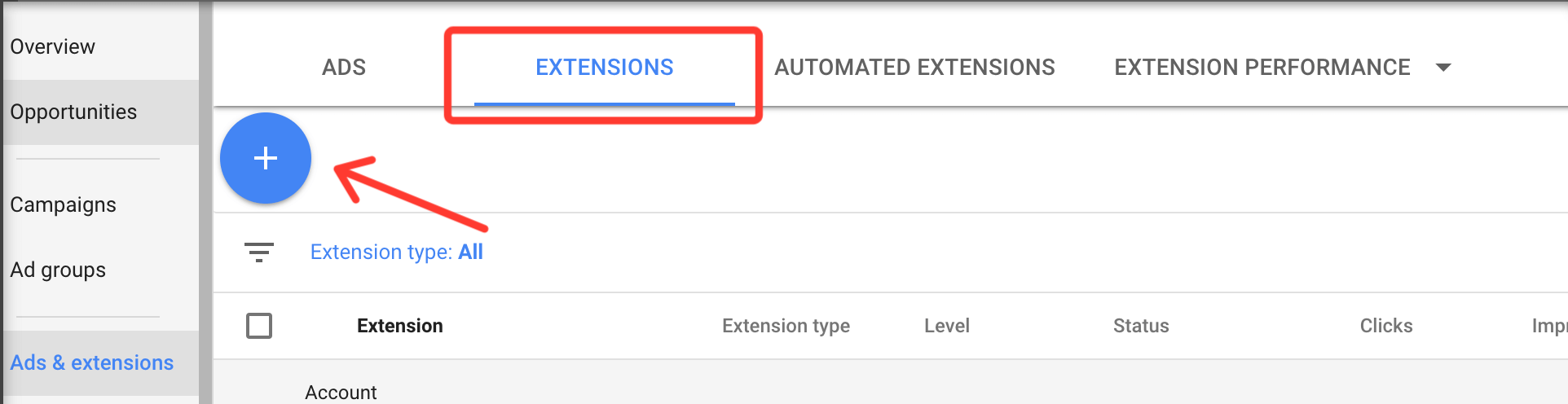
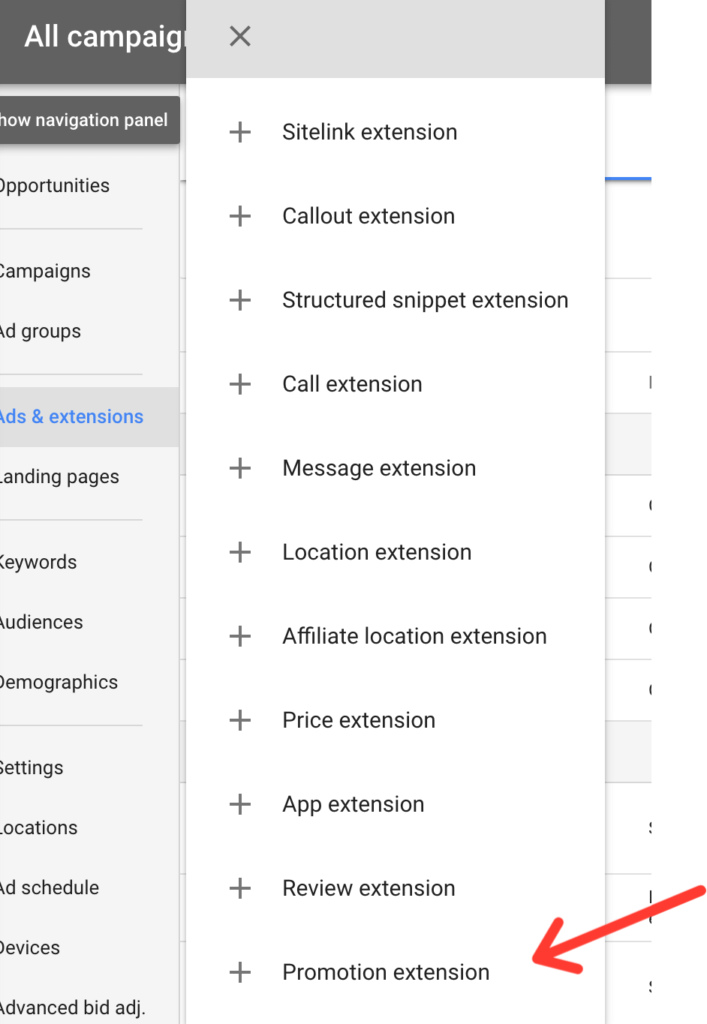
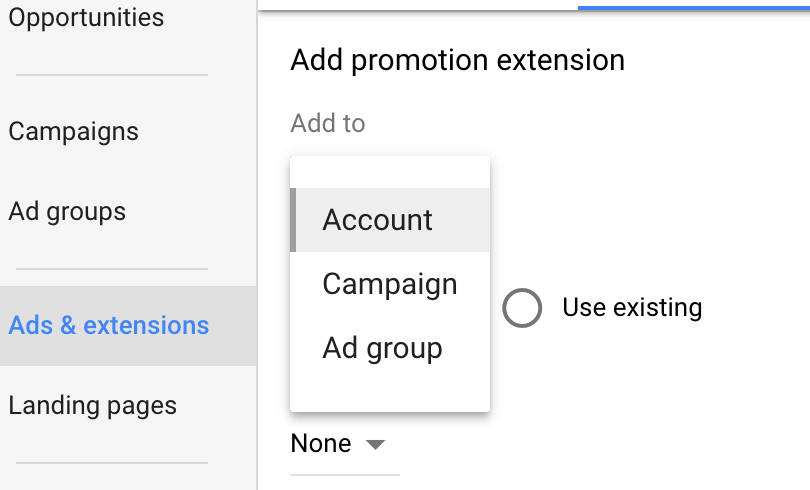
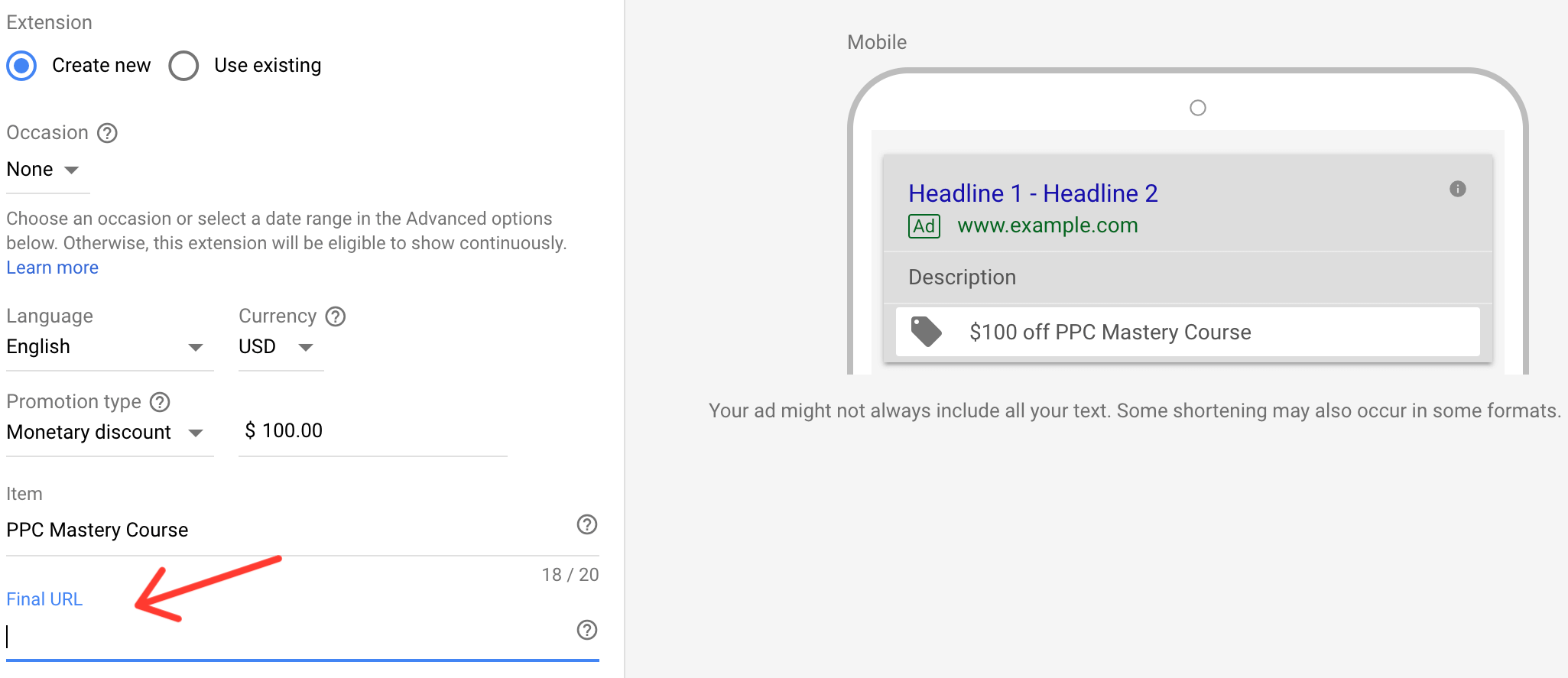
Setting up this extension is easy. You can find the extension listed at the very bottom of the extensions drop-down menu.  Once you’ve selected the extension, you can choose to run it at the account level, campaign level or ad group level.

AdWords promotion extension

AdWords promotion extension

AdWords promotion extension

Promotion Extension Features

Occasion feature

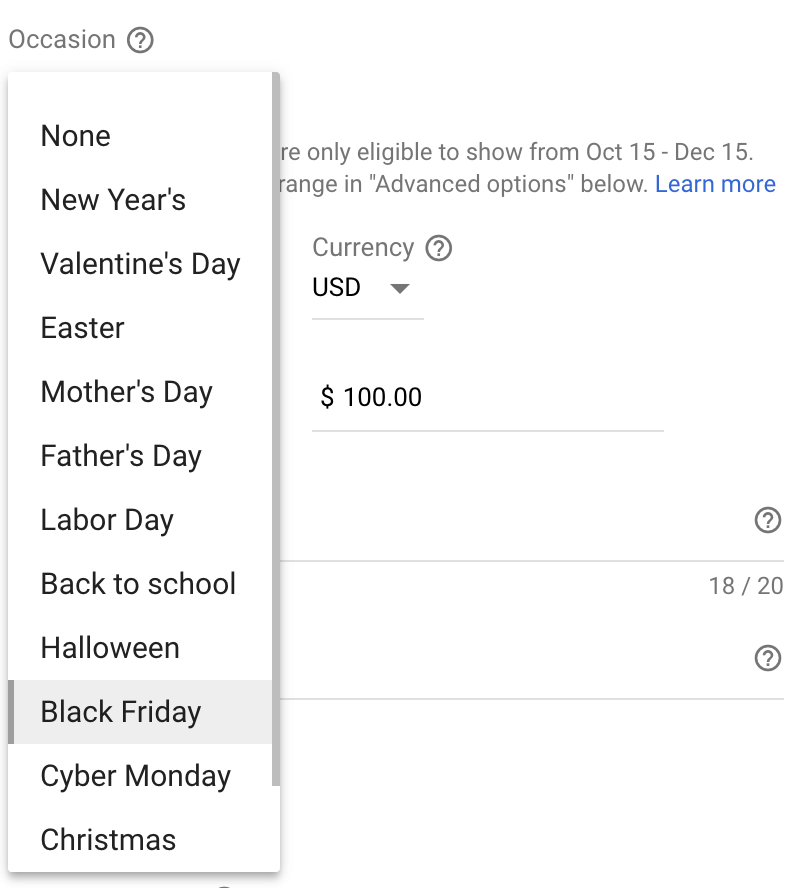
One of the slickest features of the promotion extension is the occasion option. This option enables you to feature the holiday that coincides with the sale in your ad. Calling attention to the holiday that your deal is associated with, allows you to capitalize on the hypersensitivity of the holiday shopping mindset.

AdWords promotion extension

Promotion type

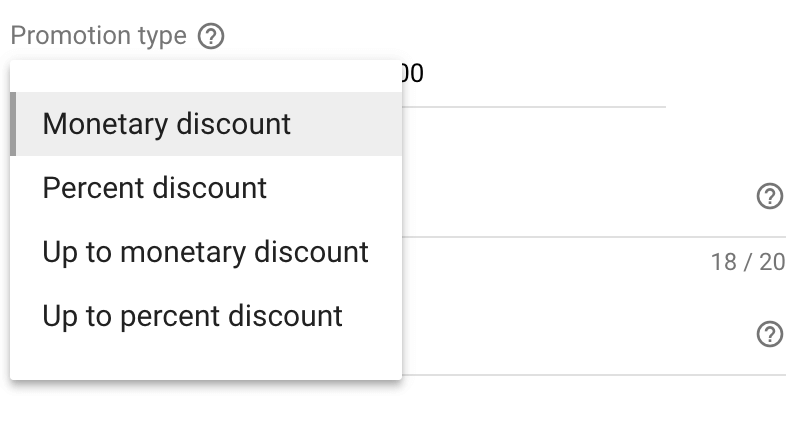
The promotion type category allows you to feature your discount in your ad. You can choose to feature a percentage or monetary discount. Calling attention to savings in your ad extension will help to engage shoppers with your offer immediately.

AdWords promotion extension

Promotion dates

The date range enables you to feature the time frame of your deal. Displaying start and end dates on your deal allows you to create urgency around your offer.

Promotion landing page

After you’ve listed the product you’re promoting in the item field, you need to enter your final URL. Keep in mind that the goal of this extension is to get searchers to click through from the extension to your final URL and redeem your deal. The deal in your ad needs to be on the landing page you select as your final URL.

If the offer in your extension is not on your landing page, AdWords will not activate your extension.

AdWords promotion extension

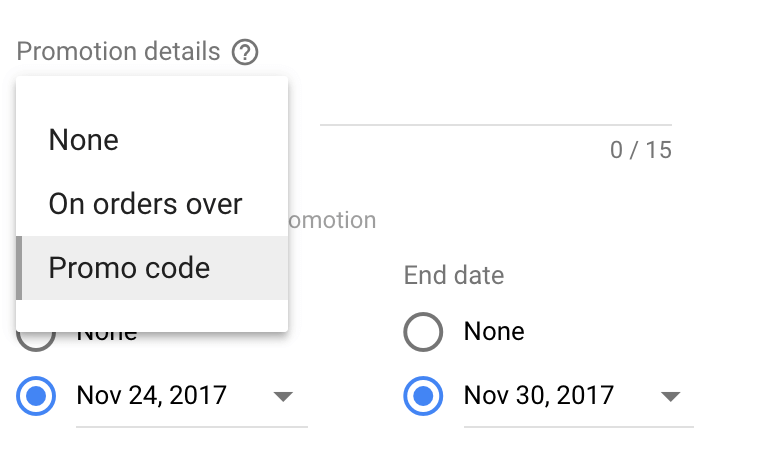
Promotion details

The promotional details option allows you to enter a promo code or specify a monetary limit for your offer.

Using a unique promo code in your extension is another way to track conversions. If you monitor your orders via your email or another live tracking system, your promo code will allow you to identify any conversions that resulted from your promotion extension immediately.

Showing a promo code in your ad might also lead to conversions from impressions.  A small percentage of shoppers may record your promo code and then visit your site directly to redeem the discount.

AdWords promotion extension

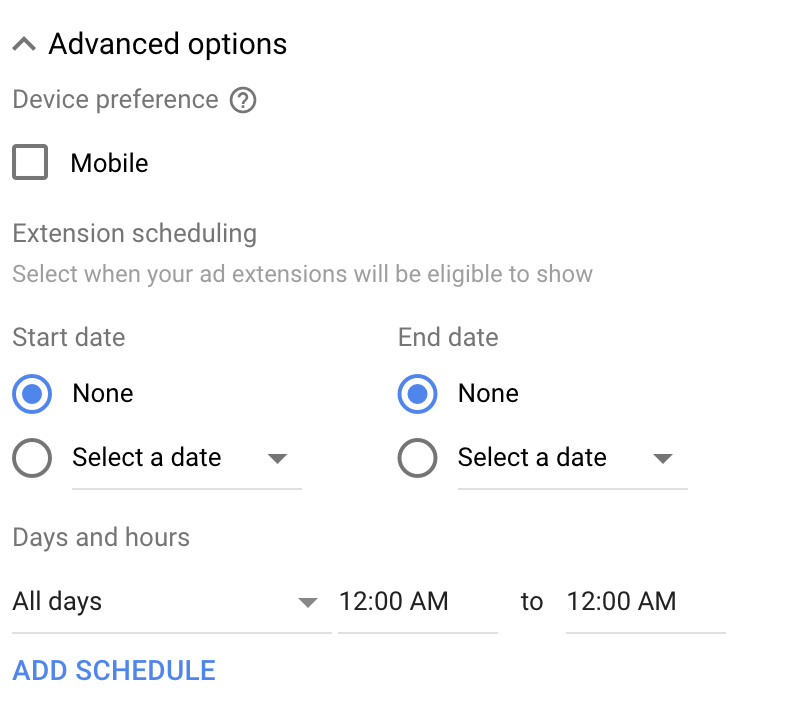
Promotion schedule

In the advanced section of the promotion extension set-up, you will find options for mobile preference and ad scheduling. You can use the advanced scheduling options to limit your promotion extensions to specific days or time frames within the time period of your discount offer.

AdWords promotion extension

AdWords promotion extension results

Google recently shared a case study about the promotion extension done by Hanapin Marketing. Hanapin found that using the promotion extension resulted in a 20% increase in return on ad spend for an ecommerce footwear client. Although this is just one small case study, the results seem promising.

As always, we recommend experimenting with this new extension. Measure your results with the promotion extension at the ad group level and scale your use of the extension as you see positive returns.

Promotion extension strategy

One way to get the most out of the promotion extension is to use it in ads that target your remarketing lists. Displaying your deals to searchers that may have already been a customer, or aware of your brand, is a great way to remind them about your sale.

Consumers see thousands of offers during the holiday season. Experiment with using the promotion extension to keep your deal visible to your best customers.

Advanced promotion strategy

The promotion extension is strictly a search ad e-commerce feature, but that doesn’t mean you have to be promoting the standard holiday goods to capture ad traffic. One technique that many marketers are deploying to capitalize on the holiday buying frenzy is a low-cost opt-in.

This strategy involves promoting a product that probably isn’t your top tier product or flagship money maker. Instead of discounting your best product, you offer shoppers a low-cost, heavily discounted item. This offer is used to get customers into your sales funnel.

Ebooks or mini-courses make great low-cost opt-ins. You could also expand your best lead magnet and offer that as low-cost opt-in.

The goal of the low-cost opt-in is to use the price of the opt-in product to cover your ad spend. Charging customers a small fee for your opt-in product allows you to pack your sales funnel with zero-cost leads. You can then offer those leads higher value products via email and re-marketing strategies.

When using the low-cost opt-in strategy keep in mind the lifetime value of your customer. The rate at which your sales funnel converts on your zero-cost leads and the lifetime value of your customer will determine the profitability of this strategy.

Do you have a holiday advertising tactic that increases your AdWords conversions? Share your best holiday advertising strategy with a comment below. 

Filed Under: PPC News

AdWords Budget Calculator

November 13, 2017 by Jeff Sauer

Today I am sharing one my favorite AdWords tools with you – the AdWords Budget calculator.

The Budget calculator is known as my “Million Dollar Sales Tool,” because I have generated millions in revenue using this methodology to help people figure out their AdWords budgets.

A lot of businesses struggle with budget planning for PPC advertising. They don’t understand which metrics are important to their online advertising. And they don’t know if AdWords is a good investment. The AdWords Budget calculator can help provide answers to these questions.

Using the budget calculator, you can show your clients, or company decision makers if AdWords will be a good investment for them.

You can download the AdWords Budget Calculator below. The video and guide in this post will show you how to use the calculator to help your clients, or business, measure the impact of their investment in AdWords.

Download AdWords Budget Calculator

[I’ve also include a bonus download and video at the end of this post, the Agency Jumpstart Revenue Calculator. The revenue calculator can be used to figure out the right revenue model for any service-based business. It’s a great revenue projection tool for marketing consultants and agencies.]

How to use the Google AdWords Budget Calculator

To create a preliminary AdWords budget, we need to know some basic business data.

Gathering this data can be difficult, but well worth the payoff. This guide will walk you through how to find data for your AdWords budget the easy way. The guide and the budget calculator will also help you find estimates when the data you need isn’t available.

Gather your organizational data

Budget Estimate – First, you need a baseline budget. Start out with a monthly amount that you believe will be within your company’s or client’s expectations.  You can adjust this number to be more accurate as you gather data from your real-life campaigns after launch.

Average Cost-Per-Click – This is the average amount Google will charge you when one of your ads is clicked on. You can find cost-per-click estimates using tools like Google Keyword Planner, SEMRush, or Ubersuggest. But be sure to take these estimates as a loose guideline, and feel free to adjust based on historical advertising data you have available.

Conversion rate – What is the rate your visitors convert into customers on your company’s website? If you don’t know your conversion rate, use ~1-2% to start. That is the “average” for the web, although most sites convert at a much higher, or lower rate.

Enter your data into the AdWords Budget Calculator

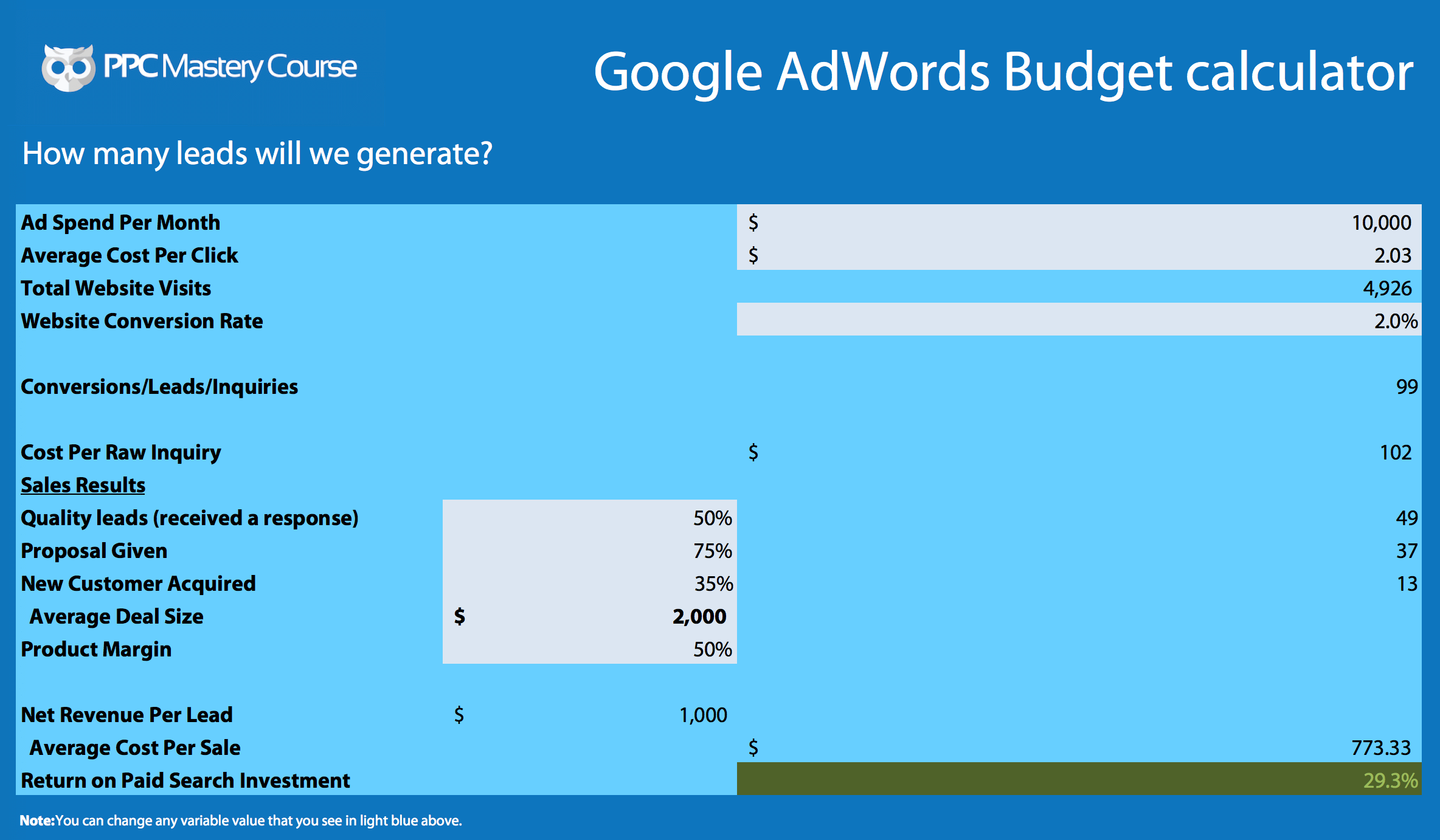
The grey cells in the spreadsheet are variables you can change to see how the adjustments affect your return on investment (ROI).

AdWords Budget Calculator

Inputting the data you collected in step 1 will provide you with some preliminary projections.

Project how online advertising affects your company’s bottom line

To develop a budget that will accurately reflect the return on the money your company invests in AdWords you need to include cost and sales data in the Budget Calculator. These values are defined below. Once again, you can use estimates if this data is not readily available to you.

Average deal size is the average amount of a customer’s total purchase.

Product margin is the amount of income generated above the cost of goods sold. For example, if your cost of goods sold is $1.00 and your product price is $2.00, then your product margin is 50%.

Proposal given is the rate at which ads result in a customer being given a price estimate.

Quality leads is the rate at which leads enter into the sales cycle and connect with one of a sales representatives.

New customer acquired is that rate at which leads turn into paying customers.

Factoring product costs into your Google AdWords budget

If your company is primarily an online seller, then product margin and average deal size will be the most important metrics to focus on in the lower half of the budget calculator. You can fill in the other numbers at 100%.

Evaluate how sales structure affects your AdWords budget strategy

If your business plans on using AdWords to traffic customers to any offline sales channels, then you want to have an idea of how successful you’ll be at converting those leads into customers. Offline sales channels can include follow-up calls or emails made by salespeople after a customer submits information into an online form. These metrics are represented in the budget calculator by quote given, quality leads, and new customer acquired.  You could also modify this sheet to include details about any lead nurturing funnels that are in place.

With all your data in the calculator, you get a more precise idea of how your company’s costs affect their AdWords budget. You can also start to see where your efforts need to be directed to create a profitable advertising strategy.

Use your estimated budget to see how AdWords Impacts your business

Which areas of your company’s advertising plan or sales strategy do you need to focus on to make your AdWords budget efficient? Improving a website, landing page, or sales funnel to increase conversion rate is one of the most common ways to make AdWords more profitable.

Targeting low-cost keywords to reduce cost-per-click can also have a big impact on your ROI.

If you’re in a low traffic market, you may need to increase the price of your company’s product, or decrease cost, to make your ad campaigns profitable.

The calculator will help you show your company or clients which areas of their sales and marketing process they can improve to make AdWords profitable.  Showing clients and business decision makers how their AdWords investment will impact their bottom line is an excellent way to get “buy-in” to move forward with your AdWords marketing plans.And if you want to dig even deeper into effective Google Ads management, take a look at our 10,000+ word tutorial that covers how this budget calculator fits into overall campaign success.

If you have questions about building an AdWords budget, post a comment below.  Let us know if the calculator helps with your AdWords budget planning.


Bonus: Agency Jumpstart Revenue Calculator

I also wanted to share with you a bonus video that helps your agency or consulting business get properly compensated for your work. This methodology is designed to make sure your business is profitable from the first day you get started.

Here’s how it works. Watch the following video to see how revenue models work for agencies.


And when you are done, visit the Agency Course website to download the Agency Revenue Calculator.

You can use the calculator to asses how different revenue models will impact your agency’s revenue growth.

Finally, if you work for an agency, I have a final question for you. Do you want to grow your agency profits? Join the Agency Course Waitlist.

Filed Under: PPC News

Conversion Linker and First-Party Conversion Tracking in Google AdWords?

October 30, 2017 by Jeff Sauer

The other day I noticed something new in my Google Tag Manager account

A new tag template was available called “Conversion Linker” and there wasn’t a lot of documentation available. So I dove into figuring out what it all meant. This article is a summary of what we learned going down the rabbit hole of the most recent tracking change in Google AdWords.

If you use GTM, you may have noticed this new Conversion Linker option in your tag templates. It’s a very basic tag that doesn’t require much configuration, which also makes it easy to miss.

If you’re not using GTM, this article will still provide value, because we explain more details behind Google’s Conversion tracking changes in AdWords.

Conversion linker: how did we get here?

The Conversion Linker tag is the result of a significant change in how AdWords conversions are tracked, from third-party to first-party cookies.

The first-party cookie change applies to every user of Google AdWords who is tracking conversions (this should be everyone).

If you want to make sure you are tracking conversions accurately in the future, you will want to know which options to use within your AdWords account.

Google has introduced Conversion Linker with very little fanfare, so it’s been left to the community to develop a list of use-cases for when it is necessary. Otherwise these changes will remain quite confusing.

I want to help clear up some of this confusion.

The video and post below will guide you through the new changes in AdWords conversion tracking, why they happened, and explain which conversion tracking option is best for your needs.  We also take a look at how to set-up Conversion Linker.

Why is Conversion Linker important?

Conversion Linker, and many of the other recent Google updates are the result of Intelligent Tracking Prevention [ITP] being rolled out in the Safari browser.

Conversion Linker

Intelligent Tracking Prevention

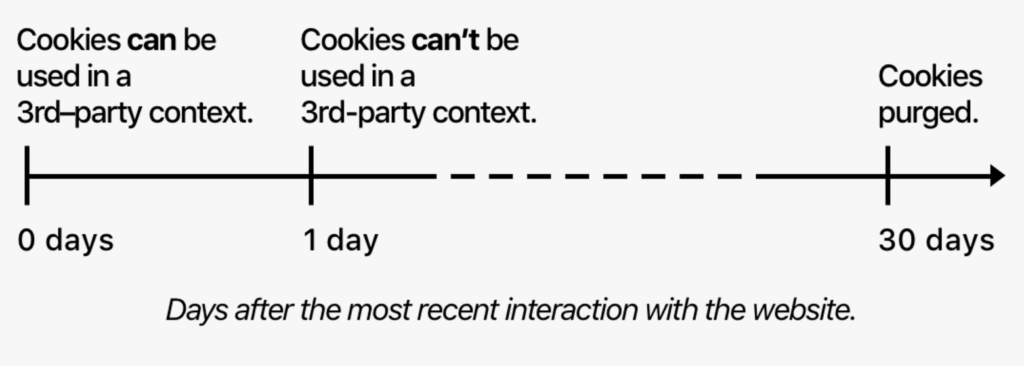
In September, Apple launched an update to the Safari browser. The Safari update includes a new Apple initiative called Intelligent Tracking Prevention (ITP). ITP cracks down on tracking website visitors across multiple websites using third-party cookies.

More precisely, ITP dumps any third-party cookies, which don’t contain login information from a users browser after 24 hours. ITP also drops all third-party cookies from the Safari browser after 30 days.

Intelligent Prevention Tracking
Image source: screenshot/Apple

ITP has some pretty big ramifications. Until now, AdWords data has been tracked using third-party cookies. The purging of third-party cookies could prevent us from tracking the source of AdWords conversions that occur in Safari.  This would break AdWords click attribution on almost half of all mobile searches.

third party cookies

Google’s response to Intelligent Tracking Prevention

Apple announced their intention to implement ITP in June. Apple’s announcement only gave Google a few months to build an entirely new way to track AdWords conversion data.

Apple essentially forced Google’s hand. Changes to the AdWords interface and conversion tracking technology were necessary to comply with ITP and keep AdWords data intact.

Google’s rush to get their new technology in place is probably why we’ve been given very little support documentation. Additionally, Google likely wanted to avoid questions from their millions of users about the AdWords changes.

AdWords conversion tracking moves to first-party cookies

Google’s solution to ITP is to push all the AdWords ad click data that used to get tracked via a third-party cookie into a first party cookie. This is the same way Google Analytics tracks conversion data. Tracking via first-party cookies falls into compliance with ITP.

To move to tracking AdWords data in first-party cookies, Google had to provide a new tracking method to it’s AdWords users.

Google’s solution involves three options, one of which you’re probably using, and two new additions.

Tracking AdWords Conversion data in compliance with Intelligent Tracking Prevention

Option #1 – gtag.js – one tag to rule them all!

gtag.js

We talked about gtag.js briefly last week, but let me provide a little more clarity about how it works.

gtag.js was built to combine both AdWords tracking and Google Analytics tracking into one tag. It does not necessarily replace the old Universal Analytics tracking code, it just sits on top of it. Kind of like a new coat of paint.

gtag.js is like an easier version of Universal Analytics or a dumber version of Google Tag Manager. It’s less technical to implement, which means the process should be easier to grasp for many advertisers.

By using the same codebase for Google Analytics and Google AdWords, you can track your AdWords conversions via first-party cookies. But it also adds a requirement of installing a second tag for tracking conversions on every page you want to track.

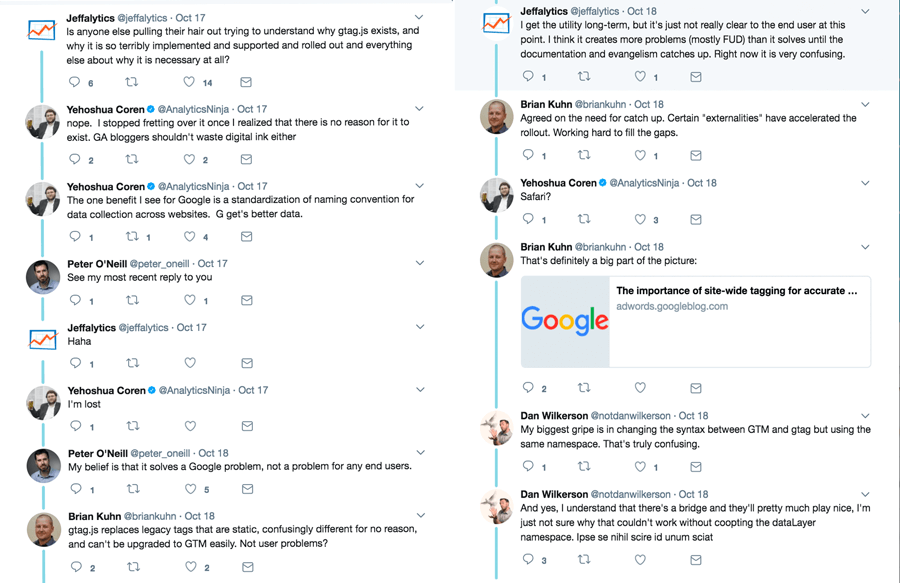
[To learn more about gtag.js, you can read our recent post on Jeffalytics. You can also follow Jeffalytics on Twitter to keep up with my rantings.]

Jeffalytics Twitter

Option #2 – Link Google Analytics to your Google AdWords account

If you are using AdWords, you probably already have this setup. According to Google, if you have your accounts linked, you don’t need to do anything to comply with ITP. This is because of auto-tagging GCLID parameter, which links data deeply between your accounts.

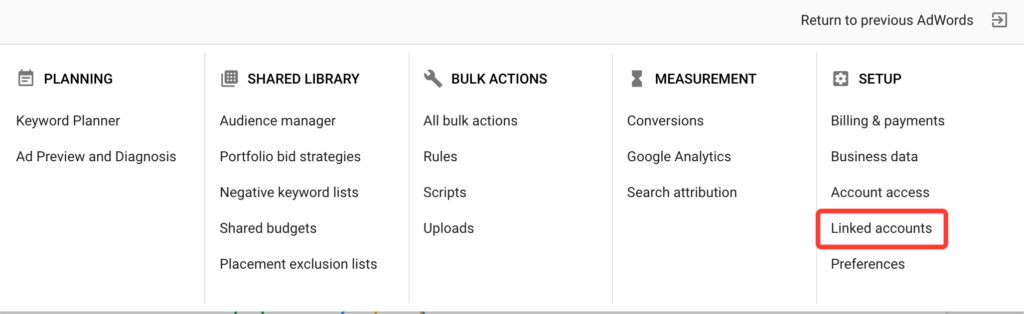
If you haven’t done this yet, it’s easy to setup. In your AdWords account select the gear icon, then choose linked accounts. From there just match your AdWords account to your Analytics account and your setup is done.

Linking Google AdWords and Google Analytics

Option #3 – The newest addition, Conversion Linker

According to Google, Conversion Linker exists for AdWords users who:

  • Have not linked their AdWords and Google Analytics accounts
  • And have not retagged their site using gtag.js

If you have already configured options one or two above, Google says that you do not need to use conversion linker.  But if you haven’t set up one of the other AdWords tracking mechanisms, and you’re using Google Tag Manager for AdWords conversion tracking, you should use Conversion Linker.

*Note: It is unclear in the documentation if you need conversion linker while using AdWords tag templates in GTM if you also have deep integration between GA and AdWords. For now, I would err on the side of caution and enable Conversion Linker if you are using AdWords conversion tag templates in GTM.

The Conversion Linker tag effectively pushes all your AdWords tracking data into a first-party cookie.

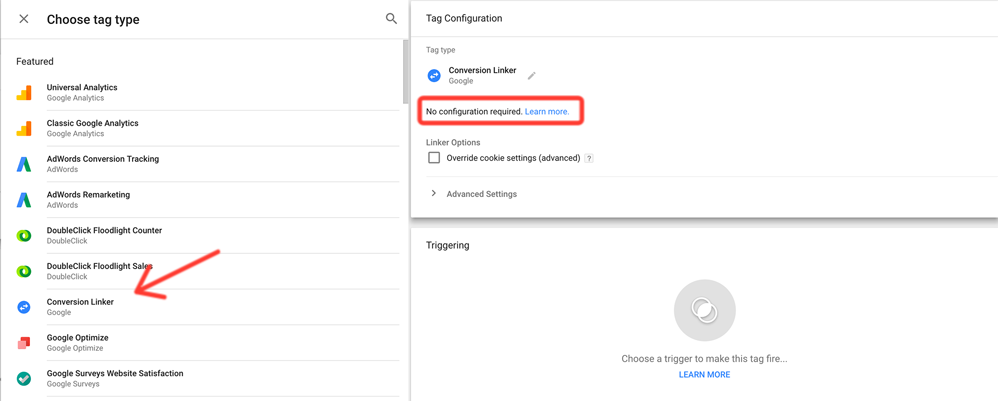
The tag is easy to setup. Select the Conversion Linker tag in the Google Tag Manager configuration menu.  Then choose a trigger for the tag to fire on, and your tag is installed. As usual, you should check and debug your tags and triggers before publishing.

How to set up conversion linker

Bottom line for tracking AdWords conversion data in the new ITP environment

You need to choose a tracking solution that utilizes first-party cookies. The three options Google supports are:

  • gtag.js
  • Deep linking of your AdWords and Google Analytics accounts
  • Conversion Linker tag in GTM

If you have questions about Conversion Linker, first-party tracking changes, or even a correction to this article, please leave a comment.

Your questions will help us all understand what’s going on, and help us make the right adjustments. Ask away!

Filed Under: PPC News

  • « Go to Previous Page
  • Page 1
  • Page 2
  • Page 3
  • Page 4
  • Page 5
  • Page 6
  • Interim pages omitted …
  • Page 11
  • Go to Next Page »

Primary Sidebar

Latest PPC Resources

  • Google AdWords and GDPR Compliance: How GDPR affects AdWords tracking and targeting
  • Automatic AdWords Ad Suggestions – Let them run or turn them off?
  • Google Marketing Platform and Google Ads – 3 Major Innovations You Need to Know About
  • Google Keyword Planner Guide 2018: Tips, Hacks and Strategies for the GKP
  • The Google Ads Optimization Score – How to use (and not use) this new report

Copyright © 2006 - 2023 · Digital Mantis, Inc.