
• Skip to primary navigation
  • Skip to main content
  • Skip to primary sidebar
PPC Mastery Course

PPC Mastery Course

Learn Google AdWords from an Expert

  • Buy PPC Course
  • Reviews
  • Resources
  • About Us

PPC News

AdWords conversion tracking with GTM in 2017 – What’s changed?

October 23, 2017 by Jeff Sauer

A new way to track Adwords conversions in Google Tag Manager

Google recently made their new and improved AdWords interface available to all users, after 17 months of anticipation since their May 2016 keynote. Last week we shared our impressions, this week we want to share a major change that came as a by-product of the AdWords refresh. The AdWords interface update has resulted in a new way of setting up AdWords conversion tracking.

This has created a problem that we only recently discovered: The current documentation about how to configure AdWords conversion tracking is not very clear, especially if you are an established advertiser.

If [like me], you recently attempted to setup conversion tracking in AdWords, you may have been left scratching your head.

The good news is there’s a simple solution. The better news is we’ve documented it for you in a guide and video below.

Setting-up AdWords conversion tracking in the New AdWords interface

You have two options for setting up your AdWords conversion tracking in the new interface.

Option #1 – Site wide tagging using gtag.js

Option #1 is to place the new global site tag – gtag.js – on every page on your site, and place the corresponding event tag on your conversion or “thank you” page.
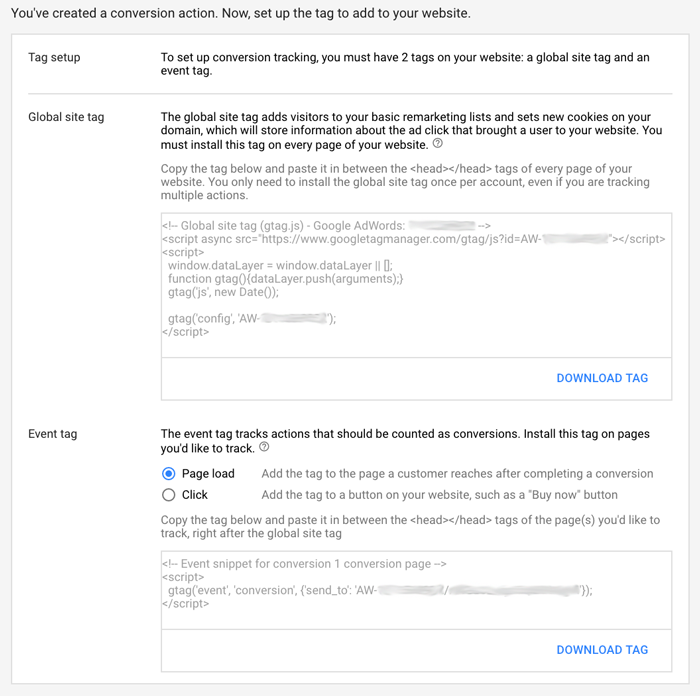
gtag.js adwrods conversion tracking script

Obviously, placing a new tracking code on every page of your site is not to be taken lightly. It’s a huge step if you just want to track a conversion. Especially if you have other tracking methods in place.

That’s why my preference has always been to track conversions in Google Tag Manager.

Option #2 – Google Tag Manager

If you have Google Tag Manager connected to your site, you can setup your Adwords conversion tracking using the AdWords Conversion Tracking tag template.

Unfortunately, this is where the out of date documentation makes things very confusing.

When you set-up AdWords tracking in Google Tag Manager, you are required to enter your conversion ID and your conversion label in the tag template.
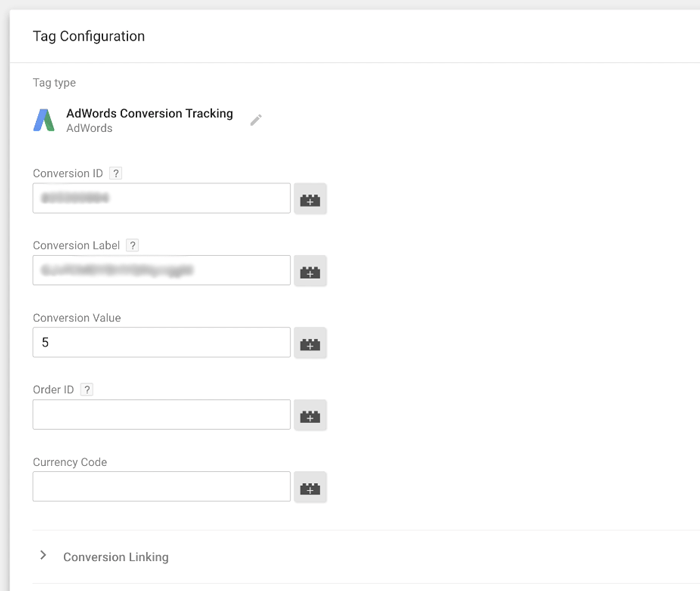
Google Tag Manager AdWords Conversion Tracking

Tag manager will instruct you to go into AdWords and look at your tracking code to find these values [conversion label, and conversion ID].

The instructions tell you to look for the number after “var google_conversion_id= ” to find your conversion ID, and look for the number after “var google_conversion_label” to find your conversion label.

There’s just one problem. These lines of code no longer exist in the global site tag – gtag.js.
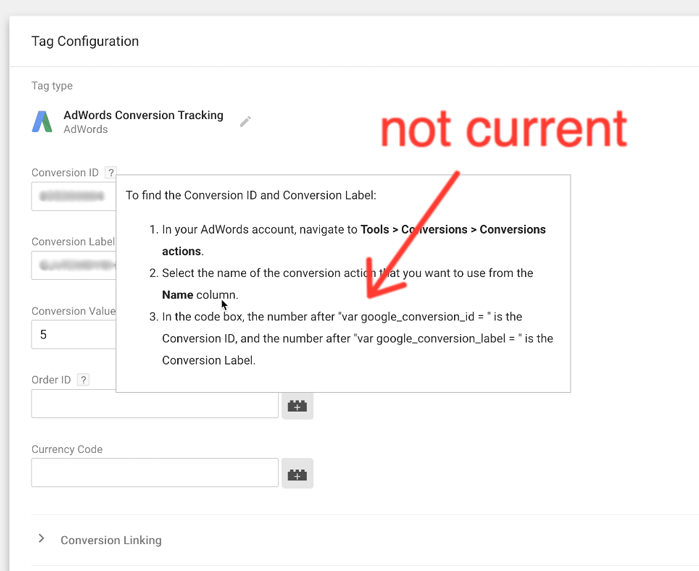
gtag.js adwrods conversion tracking script

[BTW: This was the step in my conversion tracking setup experience that led to a now infamous rant about gtag.js on the Jeffalytics blog. Thanks to a twitter conversation with Brian Kuhn at Google, I was enlightened to this simple solution.]

Where do you find your conversion ID and conversion label in the New AdWords interface?

Your conversion ID and conversion label are still in your site event code, just not where the Google Tag Manager instructions tell you to look for them.

Your conversion ID is the located in this clause: “{send_to’:’ this is your conversion ID“. And your conversion label is located just after the backslash: “{send_to’:’ AW-‘this is your conversion ID/this is your conversion label‘});.”
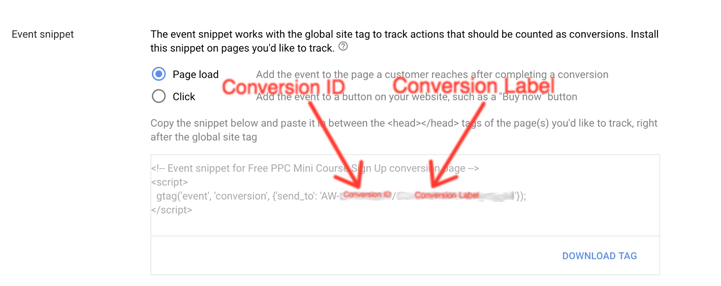
Thats it! Now that you know your conversion ID and conversion label, you can go back into Google Tag Manager and enter these values into the AdWords tag template.

Once you’ve completed this step, make sure to test that your tag fires properly on the right trigger before publishing your container.


Tracking Conversions in AdWords vs. Importing Conversions from Google Analytics

One alternative to setting up conversion tracking directly in AdWords is to import conversions from Google Analytics.

My problem with importing conversions from Google Analytics is that it’s slow. Conversion imports can take a solid 4 to 6 hour delay before conversion data shows up in your AdWords reports.

When you’re just starting a new campaign, that type of delay can be a little frustrating. It also limits your ability to make quick decisions about the direction of your ad campaign.

For these reasons, I’ve always preferred tracking my conversions directly in the AdWords interface whenever possible.


Hopefully this guide clears up any confusions about how to set up AdWords conversion tracking in the new interface.

If you have questions, leave a comment below.  There are a lot of changes going on in AdWords, and your questions will help us all learn together.

Filed Under: PPC News

Do you like your new AdWords interface?

October 16, 2017 by Jeff Sauer

The new AdWords account interface officially rolled out to everyone last Wednesday.

Have you logged in to check it out? [If you haven’t yet, you should check it out!].

This is a very significant change for all advertisers. It’s newer, it’s faster, and it’s entirely different.

That’s good, right?

Well, maybe.

Let’s talk about what the new AdWords has to offer, and what it means for your advertising account.

Major AdWords Interface Changes

What’s changed? For starters, it’s much faster.

New AdWords Interface

Gone are the days of the cumbersome, but familiar 800lb gorilla AdWords interface. No more spinning of your cursor while pages are loading. Instead, you can quickly jump from screen to screen with no delay. We’ve been playing with it all week, and I can say it’s very sleek!

Performance at the forefront

When you login, the performance graphs takes center stage. The new dashboard area allows you to instantly adjust the performance graph to feature the metrics you want to see displayed.

AdWords Performance Graph

Also, you now have a full sidebar menu that provides quick access to many of our favorite reports. You can move through campaigns, ad groups, ads & extensions, landing page reports and pretty much everything else right on the sidebar. It’s so much more efficient.

AdWords Sidebar Menu

It’s even easier to jump into your account setup, tools, shared library, and bulk actions. Same goes for creating custom dashboards and pre-defined reports.

Then there’s a new feature: You can design your own scorecards – a feature that allows you to build widget style dashboards. This has game-changing potential for your reporting needs.

These sweeping changes are pretty cool!!

AdWords Scorecard

Don’t forget to check your AdWords settings

The new UX and speed undoubtedly upgrade AdWords.

If you’re going to use the new interface, don’t forget about the details.

Do you have the right columns in place to track conversions?

Are you double checking your settings?

If you’re letting Google set-up your AdWords account, the new interface speeds up your ability to authorize the budget-draining machine.

If you’re practicing the techniques, methods, and strategies we preach in PPC Course, well then I think Google may have just made you a little more efficient.

Remember this though; speed can lead to mistakes. When you are first learning to drive, no one suggests you max out the speedometer on the interstate to see how fast you can get to your next destination.

Although fun, this is never an advisable strategy for longevity (both in life and AdWords).

By now many of you have probably heard about the time I lost $10K in an hour forgetting to adjust a default AdWords location setting. Because I survived this brutal lesson, it eventually paid for itself many times over – in a “what not to do” sort of way.

This is a clear example of a time when going faster caused me to overlook critical details. Managing PPC accounts is a detail-oriented practice. Speed only makes you better if you maintain your diligence. Check and double check your settings!

Here’s how to proceed

While you are blazing through the new AdWords interface, use a checklist to make sure you handle the fundamentals.

Hint: [You can download ours] to make sure you don’t miss crucial campaign launch steps.

Enjoy the new interface, but make it work FOR YOU, NOT GOOGLE

“Fast is fine, but accuracy is everything.” – Wyatt Earp

Let us know what you think of the new interface? Good, bad, Meh?

What do you love about it? What do you hate about it?

Comment below with your thoughts on the new AdWords interface.

Filed Under: PPC News

Your AdWords Budget? Google Just Declared War!

October 9, 2017 by Jeff Sauer

If you are managing Google AdWords, and you have a fixed budget for your campaigns, you will want to listen up to this week’s PPC newsletter. Because Google just declared open season on every last penny of your budget.

Late last week, Google quietly announced that they will now conveniently allow you to spend up to 2x your daily budget on “days with lots of high quality traffic.”

Here is the quiet announcement from Google (in the form of a support article).

This is big news, because it potentially changes everything we have come to know about AdWords budgeting. Let me explain.

Monthly budgets calculated daily​​

While almost all companies work under a monthly advertising budget paradigm, Google only allows you to set daily budgets. Most advertisers will divide their monthly budget by ~20 to ~30 days to find a daily budget number (depending on how you feel about weekends).

On a daily basis, Google would allow you to spend 20% more than your daily budget on peak budgeting days. That means if your budget was $100 a day, you might spend $120 on one day, and then $80 on another.

Now your daily budget might be $200 on one day, and $0 on another. That’s significant, and could really mess with the results for a lot of advertisers.

The good news is that Google won’t let you go over 30.4x your daily budget in a given month. Basically, you can still be safe with your days-to-months calculation, and things will even out over time. They will even return your money if you go over.

But the reason why this is concerning is that in theory, you could go the first 15 days of the month and spend your entire budget. Then have nothing showing the rest of the month. Imagine explaining that to your boss (or your clients).

While this probably won’t affect campaigns for most mature advertisers (and might actually be viewed as a positive for those who are locked-in and profitable), my concern is in those just getting started out with AdWords.

New campaigns beware​​

I’ve talked with countless advertisers who have already blown their entire budget with Google in a few days by trusting default settings. Now you can potentially lose everything even faster.

This creates an even bigger barrier of entry into AdWords, which should be concerning to Google. But I guess they have $89 billion reasons to say otherwise.

One thing I always advocate is doing a soft-launch of your new campaigns to test the waters. Use a small fraction of your budget to test out campaign settings, measure results, and reflect on what happened.

With this new development, soft-launches become even more important. Start with a fraction of a fraction of your budget, and work your way up from there. And pay extra close attention to everything when you are launching anything new.

As I say in PPC Course, “your first month is always your worst month.” That sounds tame by comparison. ​​Soon I might have to say “your first month is going to be a dumpster fire.”

More coverage of this article: Google announces AdWords daily budgets can overspend by 2x, automatically.

What do you think about Google’s 2x Budget increase?

No big deal? Worst development since enhanced campaigns?

Let’s hear it!

Filed Under: PPC News

Google Ad Updates for Videos and Phone Calls

September 25, 2017 by Jeff Sauer

This week we introduce you to some Google ad format updates, remind you that the holiday season is coming, and offer a new perspective on the Facebook ad targeting drama of last week.

New Ways to Connect and Measure on YouTube by @adwords – Some interesting developments in video advertising.

Supercharge your call-only ads with ad extensions by @adwords – Some of your favorite ad extensions are becoming available for phone-call ads too!

Smart RLSA Tips for the Holiday Season by @stephanieppcpro – Well, I guess it’s already that time of year…

The Facebook Targeting Snafu by @beyondthepaid – While Facebook rushed to do damage control, employer targeting options were removed for legitimate advertisers. Here’s a story of how this affected some advertisers.

Filed Under: PPC News

Facebook lets you target by WHAT now?

September 18, 2017 by Jeff Sauer

You may have seen the news stories about some of Facebook’s shocking ad-targeting options. If not, here is one of the many articles covering the topic.

It turns out that while Facebook had the negative press, Google has some ‘splainin to do as well.

Google Updates Keyword Tool To Remove Racist Suggestions by @rustybrick – Yes, these advertising platforms and tools are run on algorithms. But it just seems wrong to profit off of hate.

And here is a reminder about how to exclude these sites from your advertising.

It’s 10 o’Clock… Do You Know Where Your Online Ads Are? by @GrpTwentySeven – Nobody wants their brand, products or services to be associated with sites featuring hate, fake news or extremist views.

On a lighter note, here are some articles that will help you better manage your accounts in the future.

The BIG List: Recurring Account Maintenance Tasks by @ClixMarketing – Regardless of your reason for letting regular account maintenance slip, you can use this task checklist below to help you get back on track!

Get a panoramic view of your data with dashboards by @adwords official blog – Over the next several weeks, we’re rolling out dashboards: a single place where you can bring together your most important reports.

Restoration Hardware CEO reveals a startling reality about online ad spending by @businessinsider – “We’ve found out that 98% of our business was coming from 22 words.”

Filed Under: PPC News

Google’s Position in Attribution Modeling

September 12, 2017 by Jeff Sauer

The lead article from this week’s newsletter is very timely, because we discussed Google’s position in attribution in an upcoming podcast episode.

That episode will feature Maddie Cary from Point It, who is a top 25 PPC influencer in 2017. You’ll have to wait a while to hear that episode go live, but in the meantime check out this piece on Google’s leadership position in attribution modeling.

Google Attribution: Is Google stepping in because no one else would? by @Marketingland – Not sure about you, but I take the bias of “free” attribution modeling in stride. You get what you pay for.

Unforgettable Tips to Optimize Audience Targeting by @Hanapin – Don’t forget the basics while you are focusing your attention on keywords, bids, and budgets.

Negative Keyword Match Types by @krisvick – A great reminder on negative keyword match types, and how they work.

Maximize Your Ad Spend ROI with Post-Click Optimization by @Instapage – Align everything together. Keywords, ad copy and landing pages that align will yield the best results.

That’s all for this week.

Filed Under: PPC News

  • « Go to Previous Page
  • Page 1
  • Interim pages omitted …
  • Page 3
  • Page 4
  • Page 5
  • Page 6
  • Page 7
  • Interim pages omitted …
  • Page 11
  • Go to Next Page »

Primary Sidebar

Latest PPC Resources

  • Google AdWords and GDPR Compliance: How GDPR affects AdWords tracking and targeting
  • Automatic AdWords Ad Suggestions – Let them run or turn them off?
  • Google Marketing Platform and Google Ads – 3 Major Innovations You Need to Know About
  • Google Keyword Planner Guide 2018: Tips, Hacks and Strategies for the GKP
  • The Google Ads Optimization Score – How to use (and not use) this new report

Copyright © 2006 - 2023 · Digital Mantis, Inc.